> ## Documentation Index
> Fetch the complete documentation index at: https://sequinstream.com/docs/llms.txt
> Use this file to discover all available pages before exploring further.
# Transforms
> Reference for Sequin's transforms. Use transforms to modify the structure of your messages before they are sent to sinks.
Transforms allow you to modify the structure of your messages before they are sent to the sink destination. This is useful for:
* Simplifying message payloads to reduce bandwidth and storage costs
* Converting from the database's format to a format compatible with your sink destination or downstream systems
* Maintaining the same message format as you migrate from e.g. Debezium to Sequin
* Keeping payloads under size limits (e.g., SQS' 256KB limit)
## Path transform
Path transforms are the simplest kind of transform. Path transforms allow you to extract one field from your message using a dot-notation path. This is useful for:
1. Sending just the latest record to the destination (e.g., for materialized views in Postgres or data warehouses)
2. Extracting just the record ID to keep payloads small (e.g., for SQS with its 256KB limit)
### Path syntax
The first part of the path is always one of the four [keys of the message object](/reference/messages): `record`, `changes`, `action`, or `metadata`.
You can optionally add additional keys to traverse the message structure. For example, `record.id` will extract the `id` field from the `record` object.
Some examples:
| Path | Description | Example Value |
| --------------------- | -------------------------------- | --------------------------------------------- |
| `record` | The full record object | `{"id": 123, "address": {"city": "Anytown"}}` |
| `record.id` | A specific field from the record | `123` |
| `record.address.city` | A nested field from the record | `"Anytown"` |
Paths can be as deep as you need them to be. For example, `record.address.city` will extract the `city` field from the `address` JSONB column in the `record` object.
## Transform function
Transform functions allow you to write custom [Elixir](https://elixir-lang.org/) code to transform your messages. This is useful for more complex transformations that are not possible with the path transform, such as:
* Specifying a format that is necessary for your sink destination
* Sanitizing sensitive data, such as PII or payment card data
* Converting timestamp formats
* Adding computed fields
* And much more!
### Function syntax
Every function transform is implemented as an Elixir `transform/4` function:
```Elixir theme={null}
def transform(action, record, changes, metadata) do
# Your transform here
end
```
The `transform/4` function receives each key from the [message object](/reference/messages) as an argument:
* `record`: The full record object
* `changes`: The changes object
* `action`: The action type (insert, update, delete)
* `metadata`: The metadata object
Your transform must define the `transform/4` function and may not define any
other functions.
### Elixir standard library
The function transform allows you to use a subset of the Elixir standard library, including:
* [String](https://hexdocs.pm/elixir/String.html)
* [Map](https://hexdocs.pm/elixir/Map.html)
* [Enum](https://hexdocs.pm/elixir/Enum.html)
* [Date](https://hexdocs.pm/elixir/Date.html), [DateTime](https://hexdocs.pm/elixir/DateTime.html), and [NaiveDateTime](https://hexdocs.pm/elixir/NaiveDateTime.html)
* [Kernel](https://hexdocs.pm/elixir/Kernel.html)
* [Decimal](https://hexdocs.pm/decimal/readme.html)
* [URI](https://hexdocs.pm/elixir/URI.html)
* [Base](https://hexdocs.pm/elixir/Base.html)
* [JSON](https://hexdocs.pm/elixir/JSON.html)
* [Integer](https://hexdocs.pm/elixir/Integer.html)
* [Regex](https://hexdocs.pm/elixir/Regex.html)
* [List](https://hexdocs.pm/elixir/List.html)
In addition to the standard library modules, you can also use certain other dependencies:
* [UUID](https://hexdocs.pm/uuid/readme.html)
Other parts of the Elixir standard library and other dependencies are not yet supported. If you need something specific, please [let us know](https://github.com/sequinstream/sequin/issues/new/choose)
and we will be happy to help.
### Examples
Here are some examples of how to use the function transform:
#### Extract the record ID
```Elixir theme={null}
def transform(action, record, changes, metadata) do
record["id"]
end
```
#### Format for webhook
```Elixir theme={null}
# Format the record for ElastiCache with a specific key structure
def transform(action, record, changes, metadata) do
record_id = record["id"]
%{
key: "#{metadata.table_schema}.#{metadata.table_name}.#{record_id}",
value: record,
ttl: 3600 # 1 hour TTL
}
end
```
Both `record` and `changes` use string keys for access (ie. `record["id"]`).
In contrast, the `metadata` object uses atom keys (ie. `metadata.table_schema`).
This is because the `record` and `changes` objects are dynamically typed––they depend on the schema of the connected Postgres table. Metadata, on the other hand, is statically typed and will always have the same keys.
See the [Elixir Map docs](https://hexdocs.pm/elixir/1.12/Map.html) for more information on the difference between string and atom keys.
#### Sanitize sensitive data
```Elixir theme={null}
# Remove or mask sensitive fields
def transform(action, record, changes, metadata) do
record
|> Map.drop(["password", "credit_card", "ssn"])
|> Map.update!("email", fn email ->
[name, domain] = String.split(email, "@")
masked_name = String.slice(name, 0, 2) <> String.duplicate("*", String.length(name) - 2)
masked_name <> "@" <> domain
end)
end
```
#### Add computed property
```Elixir theme={null}
# Add a computed full name field
def transform(action, record, changes, metadata) do
first_name = record["first_name"]
last_name = record["last_name"]
full_name = first_name <> " " <> last_name
name_length = String.length(full_name)
%{
full_name: full_name,
name_length: name_length
}
end
```
#### Convert timestamp formats
```Elixir theme={null}
# Convert timestamp formats
def transform(action, record, changes, metadata) do
timestamp = record["timestamp"]
%{
unix_timestamp: DateTime.to_unix(timestamp),
truncated_timestamp: DateTime.truncate(timestamp, :second),
iso8601_timestamp: DateTime.to_iso8601(timestamp)
}
end
```
### Coming soon
* **Webhook transform**: Send messages to a webhook for transformation before delivery
### Testing transforms
When creating or editing a transform, Sequin will automatically capture up to 10 recent events from your database. You can see how your transform affects these events in real-time.
When changes occur in a connected database and you have the transform editor open, Sequin will capture events and display them in the editor:
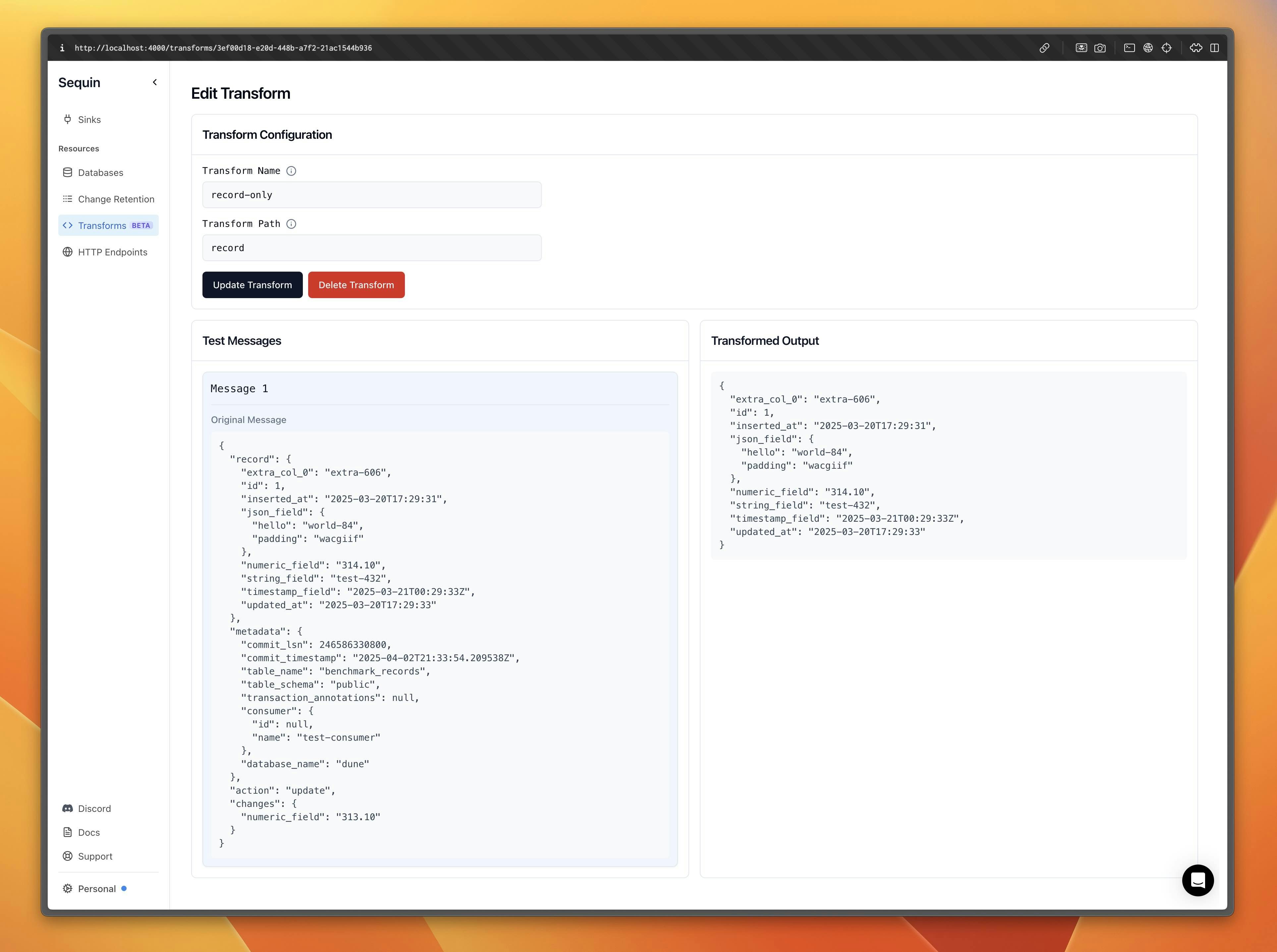 This live preview helps ensure your transform will work correctly with your actual data.
### Example use cases
#### Keeping payloads small
When using SQS (which has a 256KB payload limit), you can use a path transform to extract just the record ID:
```yaml theme={null}
transform:
path: record.id
```
Your consumer can then query the full record details as needed.
#### Maintaining Debezium-like format
For systems expecting a Debezium-like format, use a path transform to extract just the record:
```yaml theme={null}
transform:
path: record
```
This ensures your messages match the expected format without additional metadata.
## Related
Review the structure of a message.
Learn about the sequin.yaml file and how to use it to configure your Sequin instance.
Learn about filters and how to use them to filter messages before they are sent to your destination.
Learn how to use sinks to send messages to your destination.
This live preview helps ensure your transform will work correctly with your actual data.
### Example use cases
#### Keeping payloads small
When using SQS (which has a 256KB payload limit), you can use a path transform to extract just the record ID:
```yaml theme={null}
transform:
path: record.id
```
Your consumer can then query the full record details as needed.
#### Maintaining Debezium-like format
For systems expecting a Debezium-like format, use a path transform to extract just the record:
```yaml theme={null}
transform:
path: record
```
This ensures your messages match the expected format without additional metadata.
## Related
Review the structure of a message.
Learn about the sequin.yaml file and how to use it to configure your Sequin instance.
Learn about filters and how to use them to filter messages before they are sent to your destination.
Learn how to use sinks to send messages to your destination.